Connecting Your Google Business Profile
Authorise Hellopeter to access and sync your Google reviews directly to your portal dashboard.
Connect your Google Business Profile to sync all your Google reviews to Hellopeter. You'll manage every review in one unified inbox, respond without leaving the portal, and see your Google rating trends tracked automatically.
Prerequisites
Before you start: - You'll need a Google Business Profile set up for your location. - Use a Google account (Gmail or G Suite) with manager access to your Business Profile. - Your location must be verified on Google to sync reviews.
Step 1: Start the Connection
Navigate to Integrations in the left sidebar of the portal. You'll see the Google Reviews card. If you haven't connected yet, click Connect Google to open the connection wizard.
Step 2: Authorise Hellopeter on Google
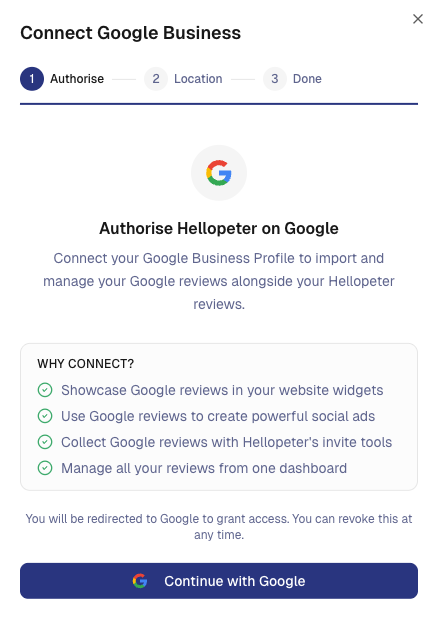
The first step of the modal shows why connecting Google is helpful. Click Continue with Google to authorise Hellopeter to access your Business Profile.
You'll be redirected to Google's login page. Sign in with the Google account that manages your Business Profile, then grant Hellopeter permission to access your account.
Step 3: Select Your Location
After authorising, you'll see a list of all locations in your Google Business Account. Select the location whose reviews you want to sync to Hellopeter.
Tip: If your location shows an unverified badge, you'll need to verify it on Google first. Visit Google's verification guide to complete the process, then come back and try connecting again.
Only verified locations can sync reviews. You can only connect one location at a time, so make sure you're connecting the right one from the start.
Step 4: Confirm and Finish
Review the location you've selected, then click Add Location. Hellopeter will immediately start syncing your Google reviews to your dashboard.
You'll see a success confirmation. Click Done to return to the Integrations page. Your Google Reviews card now shows Connected with your account details and review count.
After You Connect
Your Google reviews now appear in your portal under Reply. You can:
• Respond to Google reviews directly from the portal. Note that Google only supports public replies - there is no option to send private replies to Google reviews.
• Track your average Google rating trends on your dashboard.
• Display both Google and Hellopeter reviews in your website widgets.
Note: You cannot report Google reviews through the Hellopeter portal. If you need to flag a Google review, do so directly through Google.
Review syncing happens automatically. New Google reviews appear in your portal within minutes of being posted.
Managing Your Connection
To disconnect Google, click Manage Integration on the Google Reviews card and remove the account.
Note: Your existing synced Google reviews will remain in your portal after disconnecting, but new Google reviews won't sync until you reconnect.
Troubleshooting
"Failed to load locations" - Make sure the Google account you authorised is a manager on your Business Profile. If you changed Google accounts, disconnect and reconnect with the correct one.
No reviews appearing - Google reviews may take a few minutes to sync. If you still see nothing after 10 minutes, try disconnecting and reconnecting.
Can't select my location - Only verified Business Profile locations can sync. Verify your location on Google, then reconnect.
Still need help? Use the live chat inside your portal to get in touch with our customer success team.