Competitor Benchmarking
Compare your reputation performance against up to 5 competitors and identify where you stand in your market.
Plan info: Competitor Benchmarking is a Premium-only feature. Upgrade your plan to access this feature.
Competitor Benchmarking lets you see exactly how your reputation metrics stack up against up to 5 competitors in your industry. Compare across 6 key metrics: TrustIndex, NPS, average star rating, total reviews, average response time, and industry ranking.
This competitive view helps you identify your strengths, spot areas where rivals are outperforming you, and set realistic improvement targets.
How Competitor Benchmarking Works
You select up to 5 competitors to compare. The portal then displays these six key metrics side-by-side, visualised through radar charts, bar rankings, and a detailed comparison table:
1. TrustIndex (0 - 10)
2. NPS Score (-100 to +100)
3. Average Star Rating (0 - 5)
4. Total Reviews (volume)
5. Average Response Time (hours)
6. Industry Rank
Your business is always highlighted (navy), while competitors appear in distinct colours for easy tracking.
Accessing Competitor Benchmarking
Navigate to Insights > Competitors in your portal. If you're on a Premium plan, you'll see the comparison tools immediately. If you're on a Growth plan, upgrade to unlock this feature.
Selecting Competitors
Start by searching for competitors. You can compare against up to 5 businesses.
How to select competitors:
1. Click the search bar at the top
2. Type a competitor's name or business type
3. Results show matching businesses with star ratings and review counts
4. Click the + icon to add them to your comparison
5. Repeat until you've selected up to 5 competitors
The Comparing to: chip row shows your selected competitors. Click the X to remove any competitor and swap in another.
Tip: Select a mix of direct competitors (same industry, similar size) and aspirational competitors (market leaders). This shows both realistic benchmarks and stretch goals.
Understanding Each Metric
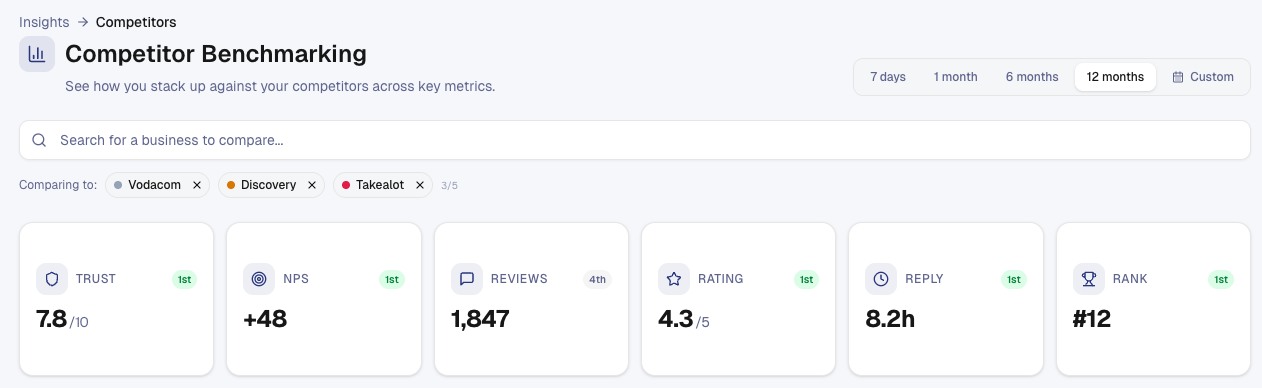
TrustIndex (0 - 10) - Your trust score. Higher is better. Shows how consumers perceive your credibility versus rivals. A TrustIndex needs at least 10 reviews inside the selected period. Below that, the card shows a dash.
NPS Score (-100 to +100) - Net Promoter Score. Higher indicates stronger customer loyalty. Shows whether customers prefer recommending you or competitors.
Avg Star Rating (0 - 5) - Your average review rating. Higher is better. A direct signal of customer satisfaction.
Total Reviews - How many reviews you've accumulated. More reviews signal larger customer base and active engagement. Higher is better, but context matters - a competitor with fewer reviews but higher ratings may be stronger.
Avg Response Time (hours) - How quickly you respond to reviews (lower is better). Fast response times show customers you're engaged and responsive.
Industry Rank - Your position within your industry cohort. Rank 1 is top performer; higher numbers indicate lower standing. A rank needs at least 12 reviews inside the selected period with half of them replied to. Below that, the card shows a dash. Industry Rank isn't available on a custom date range.
Performance Radar Chart
The radar chart visualises all six metrics at once, with your business as a solid line and competitors as dashed lines.
How to read the radar:
• Your shape (solid line) - Your overall performance profile
• Competitor shapes (dashed lines) - How each competitor compares
• Larger shapes - Stronger overall performance
• Bulges outward - Strengths in that metric
• Indentations inward - Weaker areas
For example, if your TrustIndex bulges out but your Response Time dips inward, you have a trust advantage but a responsiveness gap.
Tip: Look for the largest overall shape - that's the strongest overall competitor. Then identify where your shape differs most (both above and below). That's where to focus improvements.
Metric Comparison View
Click any metric pill (TrustIndex, NPS, Rating, Reviews, Response Time, Rank) to drill into that single metric.
You'll see:
Bar ranking - Businesses ranked by that metric. Your business shows a solid progress bar; competitors show lighter bars for easy comparison.
Trend line - A line chart showing that metric over your selected period. Spot whether you're improving, stable, or declining relative to competitors. Note that the six metrics don't all measure the same thing at each point on the line, see below.
What Each Trend Line Measures
Four of the six metrics measure only the day, week or month at each point on the line. Two measure your standing on that date across the previous 12 months of reviews.
|
Metric |
Each point on the trend shows |
|
Total Reviews, Avg Star Rating, Avg Response Time, NPS |
That day, week or month on its own |
|
TrustIndex, Industry Rank |
Your standing on that date, measured on the previous 12
months of reviews |
On the 12-month view, the last point on the TrustIndex and Industry Rank trends matches the card beside it. On shorter views the card is measured on the period you selected, while the trend still shows 12-month readings, so the two can differ. The tooltip on each of those two metrics explains this.
This zoomed-in view helps you understand one metric deeply and measure your progress on improvement priorities.
Summary Comparison Table
Scroll to the bottom for a sortable table showing all businesses and all metrics at once.
Your business row is highlighted with a subtle navy tint. Click any column header to sort by that metric, revealing where you rank.
Desktop view - All metrics visible in one table
Mobile view - Stacked cards per business, metrics grouped in 3-column grids
Colour coding highlights best and worst values, making outliers obvious.
Interpreting Your Benchmark Results
You're in the lead - If your values are at or near the top across most metrics, you're a market leader. Protect this position through consistent execution.
You're competitive - If you're in the top half for most metrics, you're holding your own. Identify one or two weak areas and focus improvement there.
You're behind - If competitors outrank you significantly, don't panic. Benchmarking identifies your priority. Pick one metric (e.g., TrustIndex) and commit to improvement. Gains compound over time.
You're unbalanced - You might rank highly on one metric but lag on another. For example: high rating (few reviews, high quality) but low volume (small customer base). Decide whether to chase scale or deepen quality.
Tip: Don't chase every metric equally. Identify your top 1 - 2 priorities based on your business goals, then measure progress monthly.
Setting Improvement Targets
Use your competitors' performance as anchors for your targets:
• If the average competitor has a TrustIndex of 7.2 and you have 6.1, target 7.0
• If the industry leader responds in 4 hours and you take 12, target 8 hours
• If your closest rival has 150 more reviews, determine how many invitations per month you need to send to close the gap
Realistic, competitor-based targets are more motivating than arbitrary goals.
Monitoring Progress Over Time
Revisit Competitor Benchmarking monthly or quarterly. Use the date range filter to compare the same period year-over-year or measure progress across months. For what each date range covers, see Understanding Date Ranges in Your Portal.
Ask yourself:
• "Have I closed the gap on my weakest metric?"
• "Have competitors moved ahead or stayed flat?"
• "Are my improvements faster or slower than the market?"
This reflection keeps you accountable and helps you adjust strategy if progress stalls.
Empty State
If your business hasn't collected enough reviews yet, this page displays an empty state. TrustIndex, NPS, and other metrics require data to calculate. Click Collect your first review to start gathering feedback.
Once you have reviews, you can immediately start selecting competitors and benchmarking.
Still need help? Use the live chat inside your portal to get in touch with our customer success team.